adsense inside post
Yesterday i was posted an article about tips how to put adsense in our blog, which one of the tips is "put your adsense in strategies area". Posting area is one of important area in our blog. Why? because it the most visitor looking for when they visit our blog. If we have good article and a lot of visitor (high traffic), is to bad if we don't put our adsense in our blog. Our adsense can be put under title post, inside post, or below post (post-footer). Now i will share how to put adsense inside post area.
Adsense inside post
To put your adsense inside post area, there are different way than if we put adsense in normally. Before we put adsense> inside post, we must convert code the adsense before. To convert your adsense code, you can use this tool, Blogrowds Resources. Just paste your code in area and then click parse button.
Convert Adsense Code

After you have convert code for your adsense, go to your Edit HMTL in your blogger account. Check "Expand Widget Templates" option.
adsense inside post
Now you must search this code one.
<div class='post-body entry-content'>
<data:post.body/>

And then add this code above that code
<div style='float: right; margin: 0px 0px 0px 10px;'>
Your converted adsense code Here
</div>

And then save your template.

Now you can look up for the result. I was used this adsense trick and the result like this one.
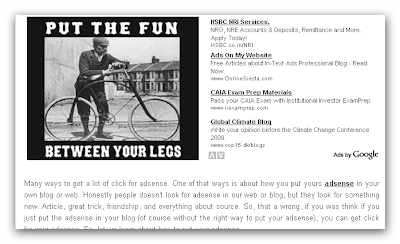
adsense Inside Post

You can change a margin of your adsense to fix it with your template.

I hope you enjoy this adsense tutorial.

Best Regard.
Blog Adsense

Many ways to get a lot of click for adsense. One of that ways is about how you put yours adsense in your own blog or web. Honestly people doesn't look for adsense in our web or blog, but they look for something new. Article, great trick, friendship, and everything about source. So, that a wrong, if you was think if you just put the adsense in your blog (of course without the right way to put your adsense), you can get click for your adsense. So, let we learn about how to put your adsense.
4 Tips How To Put Your Adsense

  • Don't use border for your adsense
    Adsense with have border make it look clustered, and visitor can know that it adsense. I wasn't use any border for my adsense. And it will be make the adsense was become a part of my blog.

  • Make an adsense have same background with your blog
    like the tips before, it is important too for your adsense to get a click. Before you set appearance for your adsense, i suggest you to know what a background of your blog (post, sidebar, or another else). To know it, just go to your template and look for HTML color code or you can use a color generator code. After you have a code color, you can set up for your adsense now.


  • Design text of your adsense too
    We have make a border go. We have used a same background color for ads too. one thing shouldn't to be forget is to design text for your adsense, or text of your blog. Why we must design a text in our blog?, because there are same template use no underline style for link text. It make a different style with adsense. Adsense was used underline style for their link, both of text ads and link ads. If you want set your link text in your blog have underline style, just add "text-decoration:underline;", like this one.


  • Put your adsense in strategies area
    Don't be confused to know where is strategies area in your blog. Google adsense was make illustration for it. I was put adsense


Best Regard
Blog Adsense
adsense mistake

I just a new member in this program. and i think join google adsense is so simple, just make a blog or web with support language (like english), and then registering our blog or web. And if we are accepted in this program, we get a code and then put in our blog....finish. But, when i am reading Joel Comm book "adsense secret", there are not so simple as i think. One thing that a very important in that book is a mistakes that adsense publisher make. Now i want share it with you.

Big Mistake #1: Not Being Familiar With Google's TOS

Adsense TosOn the one hand, this is an easy mistake to make. The terms of service
change all the time and what’s legal one day could be illegal the next — and you could know nothing about the change. On the other hand though, if something you’ve been doing is suddenly made illegal you probably shouldn’t be doing it anyway.
The bottom line is to check the TOS regularly and to make a habit of
browsing the AdSense forums. Even if you miss a change, it’s unlikely that other people will.
It’s a mistake not to stay informed.
Big Mistake #2: Inviting Others To Click Ads

click adsenseThat clicking your own ads is a mistake is pretty clear. There’s no reason to do it and no excuse for doing it.
That also includes asking other people to click on the ads for you.
For site owners used to asking their users to support their sponsors, this can take some getting used to. Once the ads are up and optimized, there’s
nothing more that you can do to persuade people to click.
If you’ve got a line on your website that asks people to support your
sponsors or if you’ve been asking people to click on your ads in any sort of way, you’re making a giant mistake.
That’s the sort of mistake that can get you banned.
Big Mistake #3: Using The Wrong Ad Blocks

ads blockThose first two mistakes will get you banned. The remaining mistakes will "only" cost you money.
Choosing the wrong ad blocks is one of the easiest mistakes to make. Almost any block can fit in almost any space but only one block will give you the
highest revenues possible.
Use this book as a guide to which blocks suit which locations best and check
out the case studies to see how other people are using a similar spot. Even if
you’re happy with your results so far, it’s always possible that you could do
even better.
Sitting on your laurels with the wrong ad block is certainly a mistake.
Big Mistake #4: Using The Wrong Colors

adsense colorExactly the same is true of your choice of colors. Forget about looking for some nice contrast or coming up with some snazzy design, you want the colors in your ads to match the colors on your site.
The background color should be the same as the background of your site and the font colors should match too.
Any other color is usually a mistake.
Big Mistake #5: Poor Page Placement

placement adsenseSome places on your page are much more powerful than others. You want to put your ads where your users are going to be looking, not where they’ll
make the page look good.
That might be at the beginning of an article, in the sidebar, at the top of the page, next to an image or any one of several dozen other spots.
Don’t be shy about putting your ads front and forward. As long as they’re
blended into the site, they won’t be anything like as obtrusive as you think. They’ll be right in front of your users and attractive enough to click.
Big Mistake #6: Not Using AdLink Units

A common mistake that people make when they first start using AdSense is to assume that only the ads units are worth taking. That’s a big mistake. Clicks on ads Link units make up a serious part of my AdSense earnings. When used properly, they should be a serious part of your AdSense earnings too. Don’t overlook Ads Link units just because they’re small. Put them in the right place and you’ll find that they can be very, very powerful
Big Mistake #7: Not Checking And Analyzing Stats

analysis adsenseOne of the biggest differences between AdSense publishers who get the big
checks and AdSense publishers who earn pennies is that the big earners are
addicted to reading their stats — and they understand what they’re reading.
It’s very tempting once you’ve set up your site and put on your ads to just kick back and look at the bottom line. But the other lines tell you what’s working and what you should be doing.
Read your stats carefully and regularly.
Copyright © 2008 Joel Comm and InfoMedia, Inc


There are several mistakes that adsense publisher usually make in google adsense program. And i think i do that mistakes too.

Hope this was useful for us.

Best Regard
Adsense Blog
adsense

I have post about google adsense text style "Ads Text Format", now i want to share about image ads. Like Text ads, image also have a same style (size). Image ads have a horizontal style with 2 type size, 468X60 and 728X90. also image ads have a vertical style in 2 size type (160X600 and 160X600), and square type (336X280, 300X250, 250X250, 200X200). So, there are no different style between text ads anf text image, just a content of ads that make it look different.
adsense
If there are no different between text ads and image ads, which one is should to be choose? I say, it's better choose ads text than ads image.

Text ads should always be your first pick when you start to load up your site. Image ads should always be your last choice.

A text ad offers many advantages over image ads:

  • You can squeeze more text ads into the space that a conventional banner takes. People love to have more choices.adsense

  • With the right formatting, a text ads 'blends in' with your site content. An image ad will not give you the same freedom with its appearance, as the only thing you can play with is the size and positioning.
    adsenseadsense
  • People hate banners and avoid them at sight. Many tests confirm that people are much more receptive to text ads related with your content.

  • Properly formatted text ads don't look like clutter. Banners do.


  • So i will choose ads text
    adsense
    than image ads, except if there are a some reason that use that style. like this one.I used it in my template blogger. I choose this style because all of my article in that blog will have an image. I was put my image in left side, and the image ads in right side. And i am hope that it wouldn't look like an ads. But in this blog post, i used text ads. It was caused that i not usually used an image in my article. So, what your choise? choose ads text than ads image? It all up to you. It's just a suggest for you.

    Best Regard

    Adsense Blog
    adsense

    Have been approved for your application? Congratulations if you have been approved by google adsense. Before you put the adsense in your blog or web, i think you should know about all of google adsense format. There are several type of google adsense unit.

  • Text Ads Format


  • There are several types of text ad. The most popular is probably the leaderboard. At 728 x 90, it stretches pretty much across the screen and while it can be placed anywhere, it’s mostly used at the top of the page, above the main text.
    adsense
    Banners (468 x 60) and half-banners (234 x 60) are much more flexible.
    Like leaderboards you can certainly put these sorts of ads at the top of the page, and lots of sites do it. Again, that’s something worth trying. You can put up a leaderboard for a week or so, swap it for a banner for another week or so, and compare the results.
    adsenseadsense
    Google adsense also offers six different kinds of rectangular ads: buttons (125 x
    125), small rectangles (180 x 150), medium rectangles (300 x 250),
    large rectangles (336 x 280), and two sizes of squares 250 x 250 and 200
    x 200.
    adsense
    The final types of text ads are those that run vertically. These come in three sizes: skyscraper (120 x 600), wide skyscraper (160 x 600) and vertical banner (120 x 240)

    There are a type of text ads in Google Adsense Program. I hope this will help you to choose a type before you put it into your blog or web.
    pxqs87ce2j
    adsense

    There are several advertise program in internet, like a google adsense, adbrite, bidvertiser, linkworth, infolinks, ask2link, etc. Google adsense is the most great advertise program from all advertise program that i know.

    How to get google adsense program? There are a basic thing when you want join a google adsense. Here are a several step to get start with google adsense.

    1.1 The Basics: Building Your Site

    Here’s the bad news: to make money with AdSense, you’ve got to have a
    website. There’s no getting around that. The good news though is that it’s
    never been easier to create a website from scratch and use it to generate
    real revenue. So, you must make a web for the first or you can make a blog in blogger. It is for free. If you already have a site up and running, you can just skip this bit

    1.2 Naming Your Site

    The first thing your site will need is a name. You should create a good name for your web or blog. Your name blog also have function for SEO.

    1.3 Designing The Site

    It used to be said that absolutely anyone could create a website. That was
    true: absolutely anyone who knew HTML. Today, you don’t even need to
    know that. Programs like Microsoft’s FrontPage or NVU (which is free; you
    can download it at www.nvu.com) let you create sites without you needing to
    know your tags from your tables. If you can use Word, you can create a
    website.
    You can either have fun playing with the programs and designing the site yourself or you can hire a professional designer to do it for you.

    1.5 Creating Content

    And that’s why it’s not worth putting up a site just to cash in on particular keywords. Google doesn’t like it and neither do users. If your site doesn’t genuinely interest your visitors, you’ll find it hard to get traffic, links and clicks on your ads.
    It’s also worth remembering that Google doesn’t place ads on particular types of sites, so if you’re thinking of building a casino site stuffed with AdSense ads, you can forget about it; it’s not going to happen.
    Before you build a site that contains any content that’s remotely
    controversial, check out the AdSense Terms of Service (TOS) to make sure that it’s allowed. It will tell whether your idea is sound or whether you need to think again

    best regard

    Trick Adsense